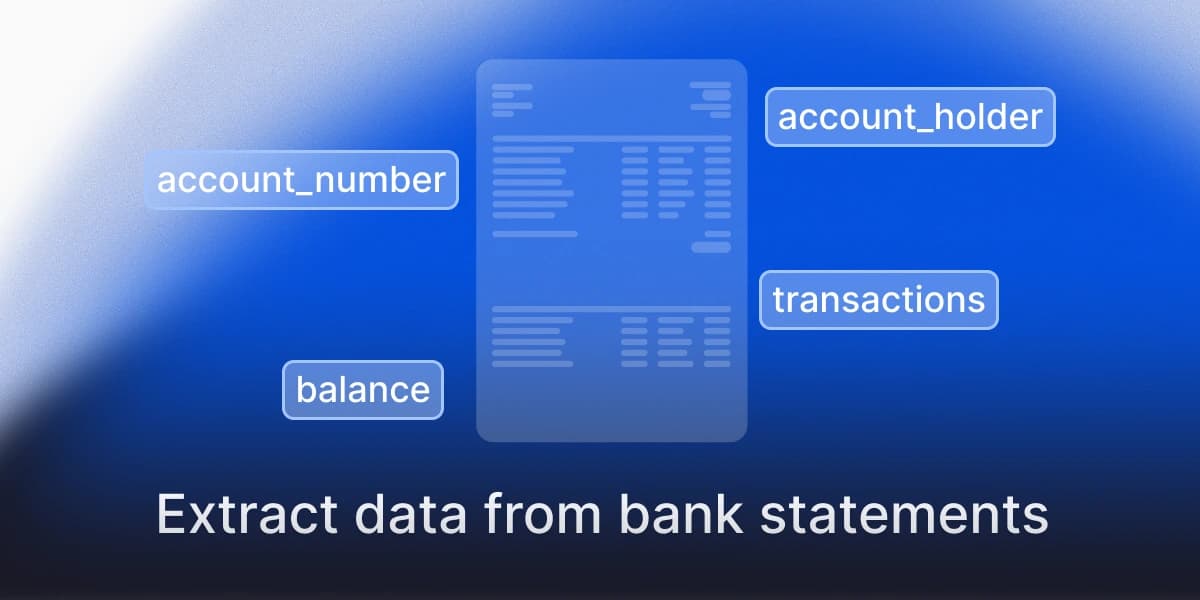
You extract data from bank statements automatically by reading each PDF or scan into a structured schema (account holder, account number, period, opening and closing balance, and one row per transaction) and then checking that the arithmetic closes: opening balance plus credits minus debits must equal the closing balance. The first step is the easy part. The check is what tells you whether to trust the output, because a bank statement is a long table where one dropped row looks exactly like a correct one.
This guide walks through the problem, the main ways people solve it, and a worked example with a fictional statement. Last evaluated: October 2026. For long statements, see how we handle multi-page documents; for finance teams, see anyformat for financial services.
Why bank statements are harder than they look
A bank statement looks like a clean table, and that is the trap. Five things make it hard to extract reliably:
- Every bank lays it out differently. Column order, date formats, whether debits and credits are separate columns or one signed column, and where the opening balance sits all change from bank to bank, and often between a bank's own products.
- Transactions run across pages. The table breaks at the page boundary, headers repeat or disappear, and a row can be cut in two.
- Descriptions wrap onto several lines. A naive parser reads the second line of a description as a new, empty transaction.
- Scans and photos. Many statements arrive as scans or phone photos, with skew, noise and stamps over the numbers.
- Several accounts or statements in one file. A single PDF can hold more than one account, or more than one month.
None of this is a reason to avoid automation. It is the reason the output needs a check built in.
What you want out: a schema
Start from the output, not from the tool. For a typical current-account statement:
| Field | Type | Notes |
|---|---|---|
| account_holder | text | As printed |
| account_number | text | IBAN or local format, as printed |
| period_start, period_end | date | |
| opening_balance, closing_balance | number | With currency |
| transactions[] | list | One entry per row |
| transactions[].date | date | Booking date; keep the value date if both exist |
| transactions[].description | text | Joined across wrapped lines |
| transactions[].debit, .credit | number | Or one signed amount, pick one convention |
| transactions[].balance | number | Running balance, when the statement prints it |
A fictional example of the result for one page (all values invented):
{
  "account_holder": "Northwind Trading Ltd",
  "account_number": "ES00 0000 0000 0000 0000 0000",
  "period_start": "2026-09-01",
  "period_end": "2026-09-30",
  "opening_balance": 12480.15,
  "closing_balance": 11902.40,
  "transactions": [
    { "date": "2026-09-02", "description": "Transfer from ACME SA, invoice 1043", "credit": 3200.00, "balance": 15680.15 },
    { "date": "2026-09-03", "description": "Card payment, Office Supplies Co", "debit": 84.90, "balance": 15595.25 },
    { "date": "2026-09-05", "description": "Direct debit, Utilities Ltd, September", "debit": 312.60, "balance": 15282.65 }
  ]
}
Ways to extract bank statement data, compared
| Approach | Handles different banks | Handles scans | Catches wrong rows | Typical limit |
|---|---|---|---|---|
| Copy and paste into a spreadsheet | Yes, by hand | No | Only if you check | Hours per batch, error-prone |
| Template or rules per bank | One template per layout | Poorly | No | Breaks when a bank changes its PDF |
| Generic OCR plus a table library | Partly | Yes | No | Tables with merged or wrapped cells fail silently; see our table-library test |
| Prompting a general LLM with the file | Yes | Yes | No | Fluent output with no signal for a wrong row; see how to reduce hallucinations |
| A bank-statement specialist (for example DocuClipper) | Yes, built for financial formats | Not stated in our comparison | Not stated | Narrow to financial documents; flat monthly tiers (Starter $20 for 60 pages, Business $111 for 640, Enterprise $360 for 2,000), no on-premise or EU residency in its published docs (as-of 2026-09-14, our Nanonets comparison) |
| A pretrained document-AI platform (for example Docsumo) | Pretrained bank-statement model; custom types need about 20 training samples | Not stated in our comparison | Not stated; 99%+ on bank statement data is vendor-reported and unaudited | Pricing on quote (anyformat vs Docsumo) |
| A document platform with validation | Yes | Yes | Yes, if you configure the check | You define the schema and the rules once |
The column that matters is "Catches wrong rows". Every method on this table reads a statement. Few tell you which rows to distrust.
How to extract data from a bank statement with anyformat, step by step
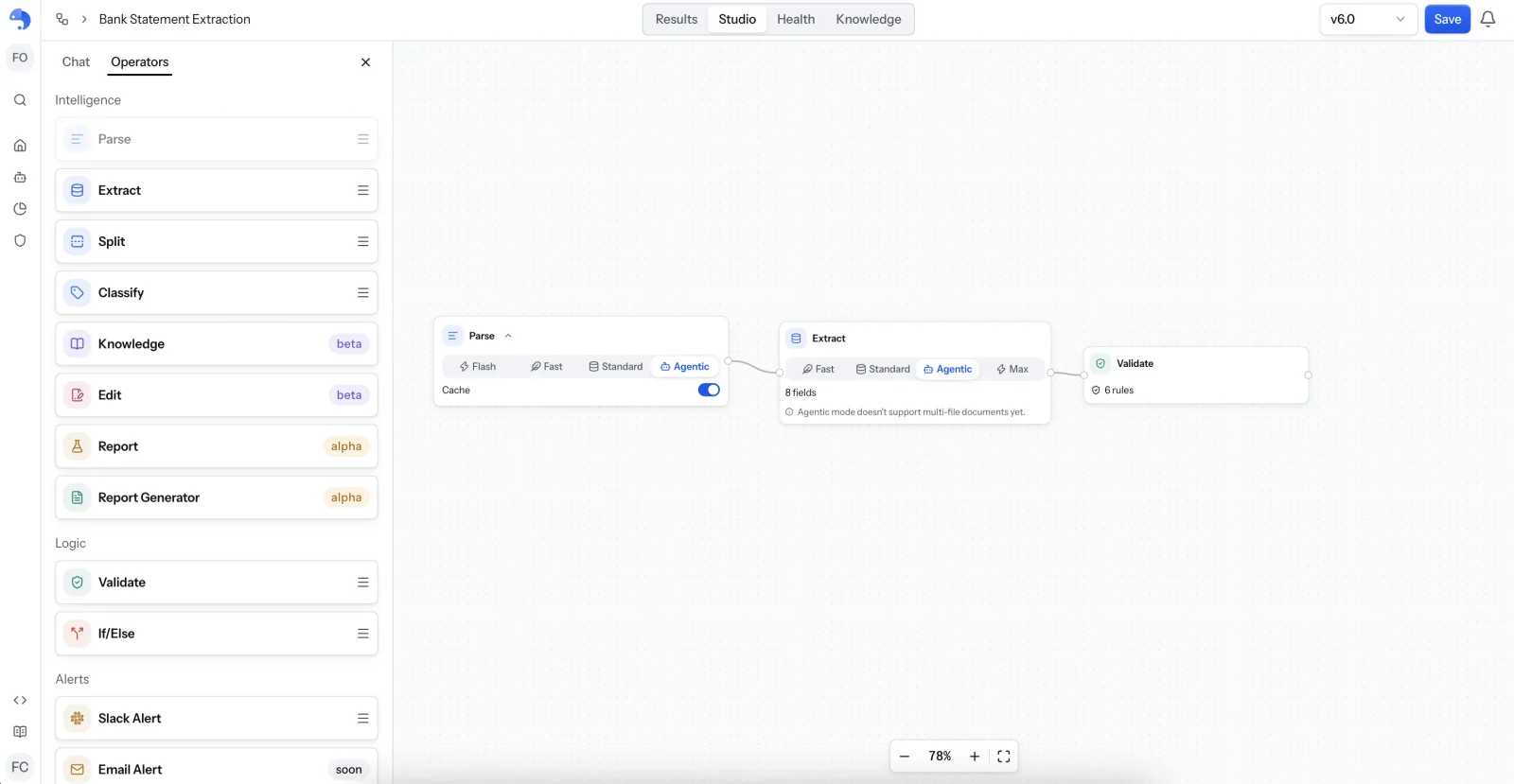
The same statement runs through four steps in an anyformat workflow, built in Studio as a three-operator flow: Parse, Extract and Validate.
-
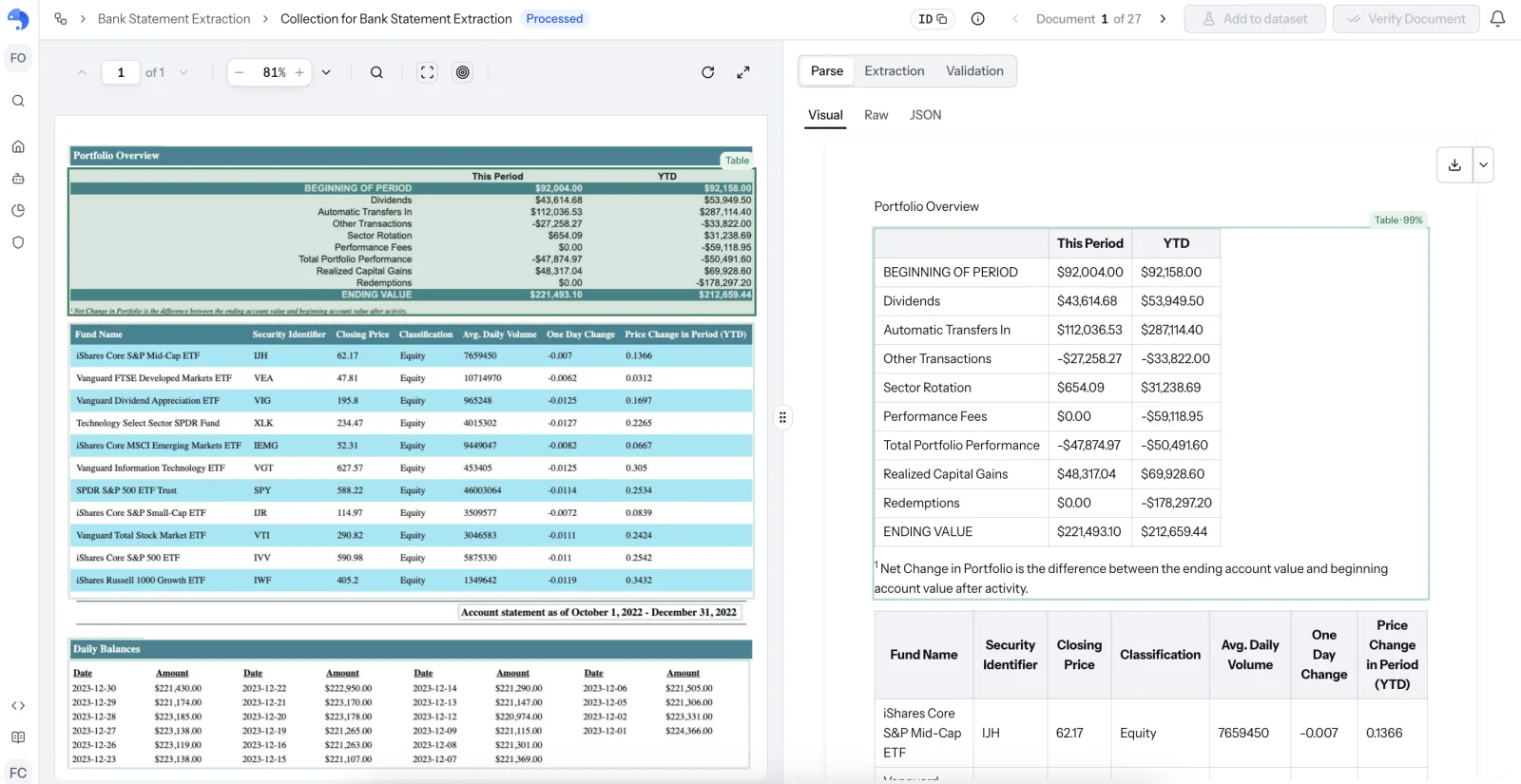
Parse. The file becomes structured pages and tables, with each block tied to its position on the page and a confidence score on each table. Scans go through OCR first. In this workflow Parse runs in Agentic mode.
-
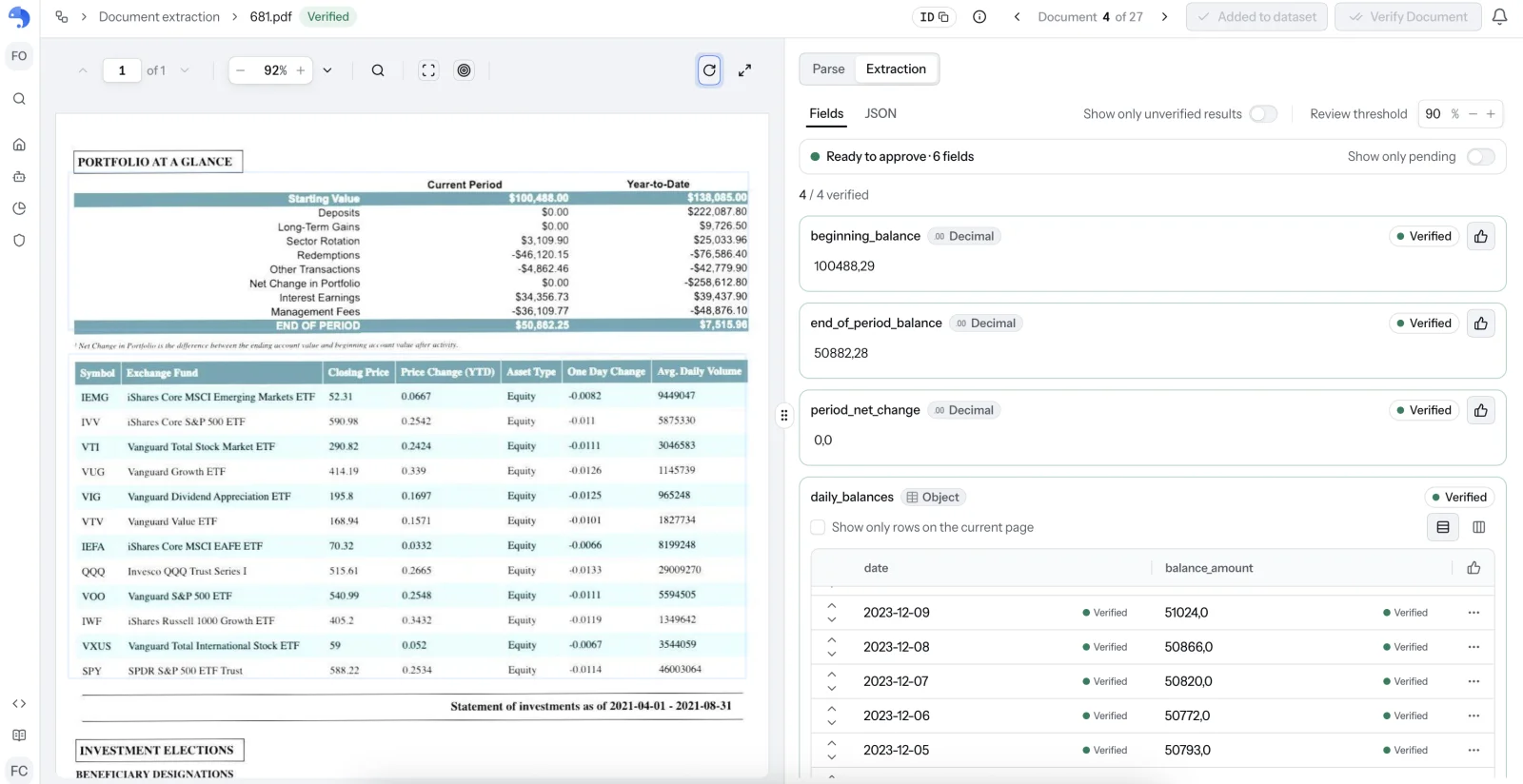
Extract. You describe the schema above in plain language. Header fields come out as single values, and the transactions come out as a list with one entry per row. Extract runs in Agentic mode here, with the 8 fields of the schema. Each field shows its type, whether it is verified, and the review threshold you set. Agentic mode does not support multi-file documents yet.
-
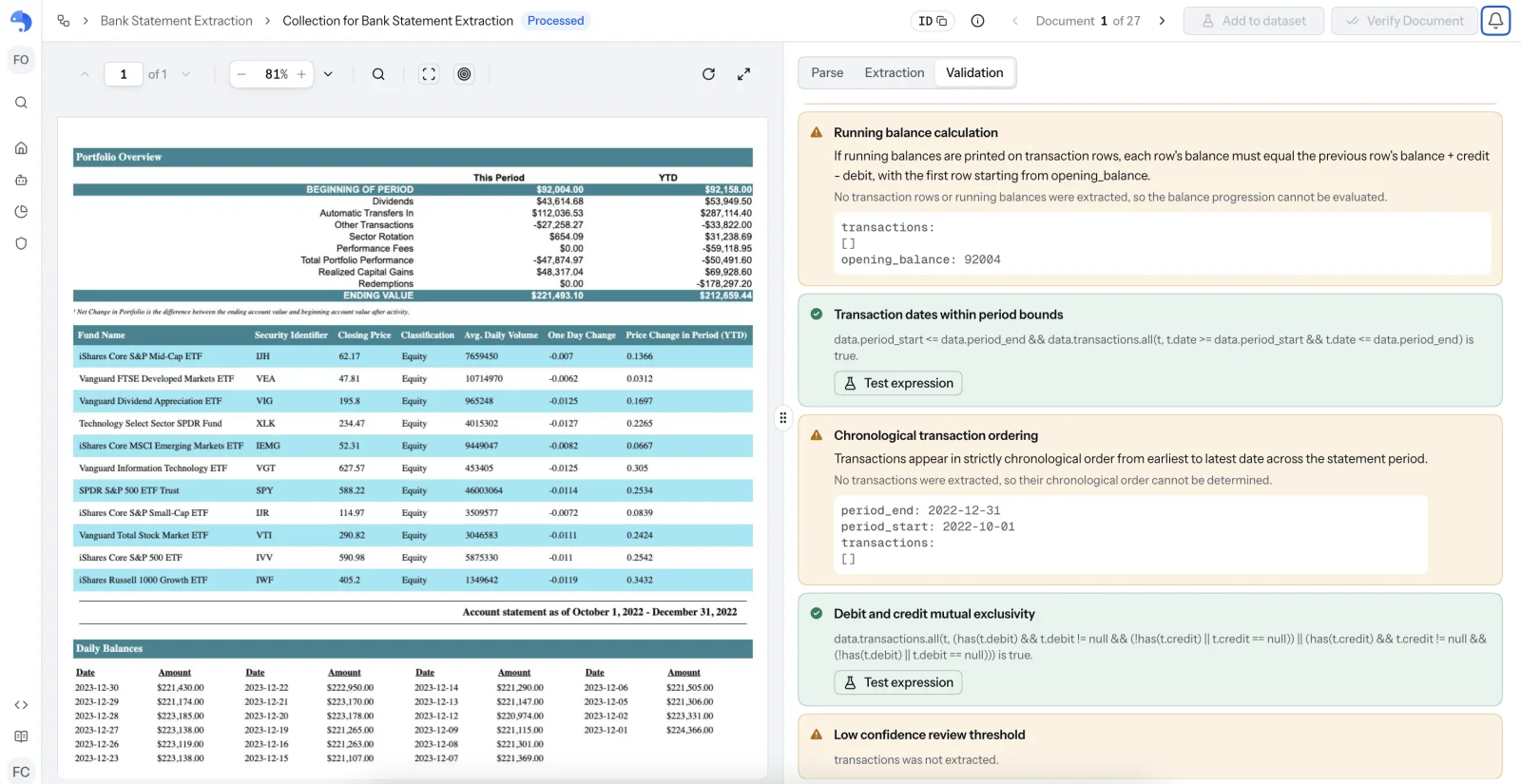
Validate. Rules check the result against itself: opening balance plus credits minus debits must equal closing balance; each running balance must follow from the previous one; every transaction date must fall inside the statement period; transactions must be in chronological order; a row cannot hold both a debit and a credit; and values under the confidence threshold are flagged for review. The Validation view shows each rule with its result and the values it checked, and you can test an expression before you rely on it.
-
Review what is doubtful. Every extracted value carries a confidence score you can set a threshold on and a link to the place on the page it was read from. Rows under the threshold, or any statement whose balance check fails, go to a person who sees the source next to the value.
What this changes in practice: you do not read every row. You read the rows the check or the confidence flags, and everything else flows through.
Try it on your own statements: the Free tier includes 50,000 credits, enough to run this workflow on a batch of fictional or consented statements without a credit card.
How to convert a bank statement to Excel or CSV
Once the transactions are structured, the Excel or CSV export is the easy part: each transaction becomes a row, with date, description, debit, credit and balance as columns, and the header fields (account holder, account number, period, opening and closing balance) go in a summary sheet or repeat on every row, whichever your accounting tool expects. The step that decides whether the spreadsheet is usable is the one before it: a spreadsheet built from an unchecked extraction hides its errors in plain sight. Run the balance check first, then export only the statements that pass, and send the rest to review.
A balance check, spelled out
If the opening balance is 12,480.15, credits total 3,200.00 and debits total 3,777.75, the closing balance must be 11,902.40. If the extraction returns 11,818.00, one row is wrong or missing and the statement is flagged, instead of the error reaching your ledger. The same logic catches a dropped row, a misread digit and a duplicated line. (The figures are the fictional ones from the JSON above, extended to a full month.)
Statements are personal data
Bank statements carry personal and financial data. Use fictional or consented documents for tests, keep production data inside a deployment you control, and check where each tool processes it. anyformat is ISO 27001:2022 certified, offers EU data residency and can run self-hosted or air-gapped. Zero data retention is an Enterprise option that has to be enabled for your organization, so on the Free and Business plans treat uploaded documents as stored and use fictional statements for tests. More on residency in our GDPR guide.
What it costs
Pricing is credit-based, per page and per operator. At list rates, Parse costs 25 credits per page in Standard mode and 100 in Agentic; Extract costs 35 in Standard and 150 in Agentic; and each AI validation rule costs 5 credits, charged once per extraction and never per page. A credit costs €0.001 on Business and €0.0015 on Free and pay-as-you-go.
| 10-page statement, 6 AI validation rules | Credits | Business (€0.001 per credit) | Free / pay-as-you-go (€0.0015) |
|---|---|---|---|
| Standard Parse + Standard Extract | 630 | €0.63 | €0.95 |
| Agentic Parse + Agentic Extract | 2,530 | €2.53 | €3.80 |
The Free tier includes 50,000 one-time credits with no credit card, and Business includes 500,000 credits a month. Standard mode is the right starting point for clean digital statements; Agentic is for scans and layouts that Standard gets wrong.
Limits, stated plainly
- Handwriting and very low-quality photos are the weak spot of every approach. Set a confidence threshold and let a person review those.
- Statements with unusual structures (multi-currency accounts on one page, summary pages that repeat totals) need a test on your own files before you trust them.
- The balance check only works when the statement prints balances. Some formats print only movements; then the check compares totals, not running balances.
- We have not published an accuracy figure for bank statements. Test fifty of your own statements, measure field-level accuracy and the share that pass with no human touch.
How to choose
If you process a handful of statements a month in one layout, a template or a converter is enough. If layouts vary, scans are common, or an error in a ledger is expensive, choose a tool where a failed check is visible: the question to ask every vendor is "when a balance does not close, what does my team see?". For broader comparisons see the best document parsing APIs and alternatives to Nanonets.
Frequently asked questions
How do I extract data from a bank statement PDF automatically?
Read the file into a schema (header fields plus one row per transaction), then verify that opening balance plus movements equals closing balance. Tools differ mainly in whether they tell you which rows to distrust.
Can I extract data from a scanned bank statement?
Yes, with OCR before extraction. Accuracy drops with skew, noise and photos, so scanned statements need a confidence threshold and a review step.
Can I convert a bank statement to Excel or CSV?
Yes: once the transactions are structured, exporting to CSV or Excel is a formatting step. The hard part is the extraction and the check, not the export.
How do I know the extracted transactions are correct?
Run the balance check. If opening balance plus credits minus debits does not equal the closing balance, a row is wrong or missing. Per-field confidence tells you where to look first.
Is it safe to upload bank statements to an extraction tool?
Check retention, residency and certifications before you upload real data, and test with fictional statements first.
Does it work for statements from different banks?
Template-based tools need one template per layout. Schema-based tools read each layout from your field definitions, but you should still test a sample from each bank you handle.
Start with your hardest documents. Upload the statements that break your current pipeline, define the fields you need, and see the values with their confidence and their evidence on the page. The Free tier includes 50,000 credits with no credit card.
Disclosure: anyformat sells document extraction; the example is fictional and the comparison criteria are stated.