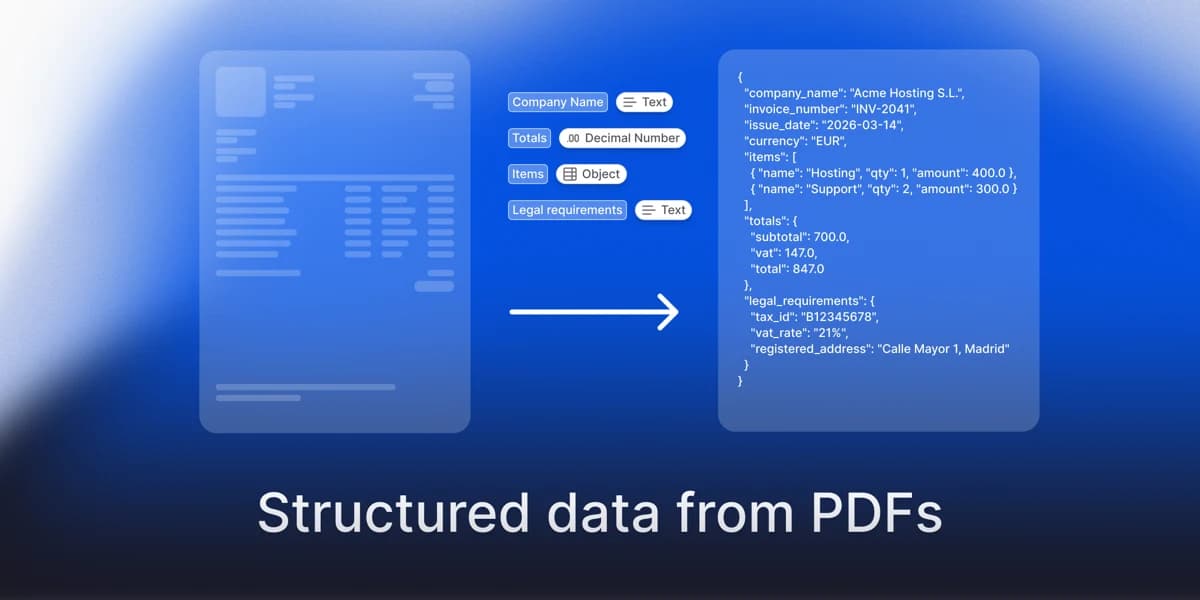
Extraer datos estructurados de un PDF con un LLM consiste en leer el texto del documento, describir los campos que quieres como un esquema y pedirle al modelo que devuelva valores que encajen con ese esquema en formato JSON. Funciona con diseños que el modelo no ha visto nunca, y por eso sustituyó a las plantillas por proveedor. También falla de formas previsibles, y buena parte del trabajo en producción consiste en detectar esos fallos.
La mayoría lo hace por una de cuatro razones: montar un RAG sobre sus propios documentos, cargar los valores en una base de datos o una hoja de cálculo, disparar un flujo de trabajo cuando llega un documento (una factura que aprobar, un formulario que enrutar) o darle a un agente hechos con los que trabajar en lugar de páginas que leer. En todos los casos el objetivo es el mismo: convertir un documento en campos que un programa pueda usar.
Esta página lo hace de principio a fin en Python: un script que funciona, después los cinco puntos donde falla y, por último, qué añadir para poder fiarte del resultado. El ejemplo es una factura porque todo el mundo tiene una, pero nada de lo que sigue es específico de las facturas.
Qué necesitas
- Python 3.10 o superior.
- Una clave de API del LLM que quieras usar. El ejemplo usa OpenAI; cámbialo por Anthropic o Gemini si lo prefieres.
- Un PDF, a ser posible una factura ficticia o de ejemplo, porque los ejemplos imprimen resultados y no deberías enviar documentos reales de clientes a logs ni a un modelo que no tengas aprobado. Usa el más complejo que tengas: un documento de varias páginas con una tabla, un escaneo o dos columnas. Una factura limpia de una sola página hace que cualquier enfoque parezca bueno y esconde los fallos de los que trata esta página.
- Cinco minutos para instalar las librerías:
pip install pymupdf pydantic openaiPaso 1. Sacar el texto del PDF
Un PDF es un conjunto de instrucciones de dibujo, no un archivo de texto, así que el primer paso es convertir las páginas en texto que el modelo pueda leer. Si el PDF tiene capa de texto, una librería como PyMuPDF la lee directamente.
import pymupdf

def pdf_to_text(path: str) -> str:
    doc = pymupdf.open(path)
    pages = [f"--- page {i + 1} ---\n{page.get_text()}" for i, page in enumerate(doc)]
    return "\n".join(pages)
Conservar los marcadores de página importa más adelante: te permiten señalar de dónde salió un valor. Si esto devuelve casi nada, el PDF es un escaneo y no tiene capa de texto. Ese es el fallo 1 de más abajo.
Paso 2. Describir lo que quieres como un esquema
Un esquema es una descripción tipada de la salida: nombres de campo, tipos y qué significa cada campo. Declararlo obliga al modelo a devolver un valor con la forma correcta en lugar de escribir prosa.
| Campo | Tipo | Descripción que lee el modelo |
|---|---|---|
| invoice_number | texto | ID de la factura tal como está impreso, normalmente cerca de la parte superior |
| issued_on | fecha | Fecha de emisión, no la de vencimiento |
| supplier_name | texto | Quién emite la factura |
| currency | texto | Código ISO, por ejemplo EUR o USD |
| purchase_order | texto | Número de pedido, solo si hay uno impreso |
| tax | número | Importe total de impuestos, solo si aparece por separado |
| total | número | Total general con impuestos incluidos |
| line_items | lista | Una entrada por fila de la tabla: descripción, cantidad, precio unitario, importe sin impuestos |
Lo mismo escrito como código con Pydantic, que es lo que pegas en el script:
from datetime import date
from pydantic import BaseModel, Field

class LineItem(BaseModel):
    description: str
    quantity: float
    unit_price: float
    amount: float = Field(description="Line amount before tax")

class Invoice(BaseModel):
    invoice_number: str | None = Field(default=None, description="Invoice ID as printed, usually near the top")
    issued_on: date | None = Field(default=None, description="Issue date, not the due date")
    supplier_name: str | None = Field(default=None, description="Who issued the invoice")
    currency: str | None = Field(default=None, description="ISO 4217 code, e.g. EUR, USD")
    purchase_order: str | None = Field(default=None, description="Purchase order number, only if one is printed")
    line_items: list[LineItem] = Field(default_factory=list)
    tax: float | None = Field(default=None, description="Total tax amount, only if shown separately")
    total: float | None = Field(default=None, description="Grand total including tax")
Las descripciones son el prompt. "Issue date, not the due date" evita la confusión más habitual en las facturas y no cuesta nada. Todos los campos son opcionales a propósito: si el documento no tiene fecha de emisión o total, el modelo tiene que poder decirlo en lugar de inventarlo.
Paso 3. Pedirle al modelo un JSON que encaje con el esquema
Salida estructurada significa que el modelo está obligado a devolver un JSON que valide contra tu esquema, de modo que recibes un objeto y no texto que tengas que interpretar. La mayoría de los proveedores la admiten; la guía de salidas estructuradas de OpenAI describe la versión de OpenAI. Este ejemplo usa el SDK de Python de OpenAI, y el mismo patrón funciona con Anthropic o Gemini.
from openai import OpenAI

client = OpenAI()  # lee OPENAI_API_KEY del entorno

def extract_invoice(text: str) -> Invoice:
    response = client.responses.parse(
        model="gpt-5",  # usa el id de modelo vigente el día que lo ejecutes
        input=[
            {"role": "system", "content": (
                "Extract the invoice fields from the document. "
                "If a field is not present in the document, do not guess it."
            )},
            {"role": "user", "content": text},
        ],
        text_format=Invoice,
    )
    return response.output_parsed
La función recibe el texto como argumento porque el siguiente paso necesita ese mismo texto para comprobar el resultado.
Paso 4. Comprobar el resultado antes de fiarte
Un paso de validación es código determinista que comprueba si los valores extraídos son coherentes entre sí y con el original. Detecta los errores que parecen correctos.
def check(invoice: Invoice, source_text: str) -> list[str]:
    problems = []

    # 1. Completitud: los campos imprescindibles deben estar presentes.
    for name in ("invoice_number", "issued_on", "total"):
        if getattr(invoice, name) is None:
            problems.append(f"{name} is missing")

    # 2. Aritmética: con el impuesto indicado, líneas más impuesto deben igualar el total, al céntimo.
    #    Sin él, las líneas solo se pueden comparar con el total como límite superior.
    if invoice.total is not None:
        lines_sum = round(sum(li.amount for li in invoice.line_items), 2)
        if invoice.tax is not None:
            if abs(lines_sum + invoice.tax - invoice.total) > 0.01:
                problems.append("line items plus tax do not match the total")
        elif lines_sum > invoice.total + 0.01:
            problems.append("line items exceed the total")

    # 3. Trazabilidad: cada identificador que devuelve el modelo debe aparecer en el documento.
    for name in ("invoice_number", "supplier_name", "purchase_order"):
        value = getattr(invoice, name)
        if value and value not in source_text:
            problems.append(f"{name} not found in source text")

    # 4. Verosimilitud: una fecha futura casi siempre es una lectura errónea.
    if invoice.issued_on and invoice.issued_on > date.today():
        problems.append("issued_on is in the future")

    return problems
source_text = pdf_to_text("invoice.pdf")
invoice = extract_invoice(source_text)
problems = check(invoice, source_text)
print(problems or "all checks passed")Los bloques de esta página forman un único script: pégalos en un solo archivo, por orden, y funcionan juntos. Ese es todo el patrón. Esta ejecución imprime el resultado de las comprobaciones y no la factura, y el recorrido da por hecho que usas una factura ficticia: con documentos reales, registra nombres de campo y resultados de las comprobaciones en lugar de los valores extraídos, que pueden contener datos de clientes.
Esto es para lo que sirven las comprobaciones. Los valores de abajo son ilustrativos, no proceden de un documento real.
Un buen resultado
Un buen resultado pasa todas las comprobaciones. Las líneas suman, el número está en la página y la fecha es razonable:
{"invoice_number": "INV-2041", "issued_on": "2026-03-14",
 "supplier_name": "Acme Hosting S.L.", "currency": "EUR",
 "line_items": [{"description": "Hosting", "quantity": 1, "unit_price": 400.0, "amount": 400.0},
                {"description": "Support", "quantity": 2, "unit_price": 150.0, "amount": 300.0}],
 "tax": 147.0, "total": 847.0}
check() devuelve una lista vacía. Las líneas (700) más el campo de impuestos (147) igualan el total (847). La comprobación aritmética es exacta solo cuando la factura indica los impuestos por separado. Cuando no lo hace, solo puede detectar que las líneas superan el total, así que una línea mal leída pasa inadvertida; por eso importan las demás comprobaciones.
Un mal resultado
Un mal resultado parece igual de ordenado, y ahí está el peligro. El modelo leyó mal la tabla e inventó un número:
{"invoice_number": "INV-2014", "issued_on": "2031-03-14",
 "supplier_name": "Acme Hosting S.L.", "currency": "EUR",
 "line_items": [{"description": "Hosting", "quantity": 1, "unit_price": 400.0, "amount": 400.0},
                {"description": "Support", "quantity": 2, "unit_price": 1500.0, "amount": 3000.0}],
 "tax": 147.0, "total": 847.0}
check() devuelve tres problemas: las líneas más los impuestos no coinciden con el total, invoice_number no está en el texto original y issued_on es una fecha futura. Nada en el propio JSON indicaba que algo estuviera mal; solo lo detectaron las comprobaciones.
La comprobación de trazabilidad es la versión barata de una idea mayor: un valor que no se puede rastrear hasta la página no debería sobrevivir en tu pipeline. El tratamiento más extenso de esa idea está en cómo reducir las alucinaciones de los LLM en la extracción de documentos.
Dónde falla el script
Fallo 1: PDFs escaneados
Un escaneo no tiene capa de texto, así que pdf_to_text devuelve casi nada y al modelo se le pide extraer de un texto vacío. Detéctalo (menos de unos cientos de caracteres de texto por página, sin contar los marcadores de página) y enruta el archivo a OCR o a un modelo de visión que lea la imagen de la página. No envíes nunca el texto vacío al LLM: muchas veces devolverá valores verosímiles de todos modos.
Fallo 2: tablas
page.get_text() aplana una tabla en un flujo donde columnas y filas pueden mezclarse. La cantidad de una línea acaba junto al precio equivocado y la comprobación aritmética del paso 4 falla. Extrae las tablas como tablas (un parser que entienda el diseño, o un modelo de visión), o pásale al modelo imágenes de las páginas que las contienen.
Fallo 3: documentos largos
Un contrato de 200 páginas no cabe con comodidad en un único prompt, y los modelos leen con menos fiabilidad la parte central de un contexto largo que el principio y el final. Divide por secciones o por rangos de páginas, extrae por fragmento y luego une los resultados. La unión es donde aparecen los duplicados y los conflictos, así que conserva los marcadores de página. Hay más sobre esto en extracción de documentos largos.
Fallo 4: campos que no están en el documento
Pide purchase_order en una factura que no lo tiene y un modelo puede devolver un número verosímil en lugar de nada. Haz que la ausencia sea una respuesta válida: declara todos los campos como opcionales, como en el esquema de arriba, dile al modelo de forma explícita que devuelva null en lugar de adivinar (el prompt de sistema lo hace) y deja que la comprobación de trazabilidad detecte el resto: busca en el documento el número de factura, el proveedor y el pedido, así que uno inventado se señala.
Fallo 5: no hay forma de distinguir lo correcto de lo incorrecto a escala
El script devuelve el mismo JSON limpio tanto si leyó bien la página como si no. Con diez documentos puedes revisarlos a ojo. Con diez mil necesitas una señal por campo que te diga cuáles revisar. La confianza en bruto del modelo es una mala señal, porque tiende a ser más alta justo donde el modelo está rellenando un hueco. De este problema trata la siguiente sección.
Qué añadir para producción
Tres cosas separan un script de un pipeline: un puntero desde cada valor hasta el lugar donde se leyó, una puntuación de confianza sobre la que fijar un umbral y un sitio donde una persona revisa lo que queda por debajo. Puedes construir las tres sobre el código de arriba. La comprobación de trazabilidad es un comienzo, después vienen un conjunto de calibración y un umbral, y la interfaz de revisión es la pieza más grande.
Otra forma de hacerlo: anyformat
anyformat es una plataforma de extracción de documentos, y el script de arriba es el trabajo que hace por ti. Los pasos son los mismos (analizar el documento, aplicar un esquema, devolver campos), pero el puntero al original, la puntuación de confianza y la interfaz de revisión ya están construidos.
El workflow se define una vez como un grafo tipado, con un nodo de análisis que alimenta un nodo de extracción, y después cada documento es una subida y una consulta. Cada campo llega con su valor, una puntuación de confianza y la evidencia de dónde se leyó.
import os
from anyformat.sdk import Client
from anyformat.workflow import Schema

client = Client(api_key=os.environ["ANYFORMAT_API_KEY"])

result = (
    client.workflow("Invoice")
    .parse()
    .extract([
        Schema.string("invoice_number", "Invoice ID as printed, usually near the top."),
        Schema.date("issued_on", "Issue date, not the due date."),
        Schema.float("total", "Grand total including tax."),
    ])
    .create()
    .run("invoice.pdf")
    .wait()
)

field = result.fields["total"]
print(field.value, field.confidence)  # value es un string; la confianza va de 0 a 100
for e in field.evidence:
    print(e.page_number, e.text)
Se instala con pip install anyformat. Igual que antes, usa un documento ficticio mientras lo pruebas: el ejemplo imprime un valor y su evidencia, y los documentos reales pueden contener datos de clientes. Un campo que el modelo no pudo encontrar llega como null, con una puntuación de confianza baja para que puedas filtrarlo. La evidencia es el texto original y el número de página, de modo que quien revisa comprueba un campo señalado contra la página en segundos. La estructura de la respuesta y la lista completa de nodos están en la documentación de la API. El razonamiento detrás de la confianza por campo está en confianza calibrada, y el mismo workflow es accesible desde un agente a través del servidor MCP.
anyformat es una opción entre varias. Si procesas unas pocas decenas de documentos de un solo tipo, el script de arriba más las comprobaciones del paso 4 es suficiente y no deberías pagar por más. El caso para una plataforma empieza cuando el volumen, la variedad o el coste de un valor erróneo convierten la capa de revisión en el verdadero proyecto.
Preguntas frecuentes
¿Puede un LLM extraer datos de un PDF directamente?
Sí, si le das el texto del PDF o imágenes de las páginas y un esquema para la salida. Lo difícil no es la llamada de extracción. Es gestionar escaneos, tablas y documentos largos, y saber de cuáles de los valores devueltos puedes fiarte.
¿Qué diferencia hay entre salida estructurada y modo JSON?
El modo JSON garantiza que la respuesta sea un JSON válido. La salida estructurada garantiza además que encaje con tu esquema: los nombres de campo, los tipos y los campos obligatorios. Para extracción quieres la segunda.
¿Cómo evito que un LLM se invente valores en la extracción?
No puedes llevarlo a cero, así que hazlo detectable: declara los campos como opcionales, indica al modelo que devuelva null en lugar de adivinar, verifica que cada valor aparece en el original y valida los valores entre sí. Más sobre esto en reducir las alucinaciones en la extracción de documentos.
¿Funciona con PDFs escaneados?
No solo con una librería de texto. Un escaneo no tiene capa de texto, así que necesitas OCR o un modelo de visión antes. Detecta la capa de texto vacía y enruta en consecuencia.
¿Cuánto cuesta extraer con un LLM por página?
Depende del modelo, de la longitud de la página y de si envías texto o imágenes. Mídelo con 20 documentos tuyos antes de elegir modelo, porque las listas de precios públicas cambian con la suficiente frecuencia como para que cualquier cifra aquí quedara desfasada.