

Flash Mode: Born-Digital PDFs, Without the Model Call
Most of the PDFs a back office processes were never scanned. The text is already in the file. Flash is the Parse mode that reads it straight from the text layer, with no model in the loop, at 7 credits a page instead of 25, and returns the same blocks, bounding boxes and confidence every other operator expects.
Look at what actually arrives in a document workflow at volume and a pattern shows up quickly. The scans are the minority. Most of the pages came out of a machine: an invoice generated by a billing system, a bank statement exported from the bank's portal, a contract produced from a template in a word processor, a report printed straight to PDF. Nobody photographed them. The text is inside the file, character by character, with the coordinates of every word.
And yet the industry's default, ours included, has been to treat every page the same way: render it to pixels and hand the pixels to a model that reads them back into text. For a scan, that is the only option. For a born-digital PDF, it means paying a model, and waiting for it, to reconstruct text the file already contains.
Why the text layer was never enough on its own
If the text is in the file, why not just read it? Anyone who has tried knows the answer. A raw text-layer dump gives you the characters and none of the structure. Two columns come out interleaved. A table becomes a run of numbers with no rows. Headers, footers and page numbers land in the middle of paragraphs. Reading order follows whatever order the generating software happened to emit the glyphs in, which is often not the order a person reads. The characters are right and the document is wrong.
So the market settled on two answers. Send everything through a vision model, which is accurate and expensive. Or offer a cheap tier that is either a smaller model or plain text with no layout, which is cheaper and loses exactly the structure a downstream extraction needs. Neither treats the born-digital page as what it is: a document whose text is already known, and whose structure is the only thing left to work out.
Flash: the text layer, plus layout, minus the model
Flash is a new mode of the Parse operator. It reads the PDF's own text layer and grounds it in the layout of the page: blocks, reading order, the position of every piece of text. There is no model call. No pixels are rendered, no inference runs, no tokens are consumed.
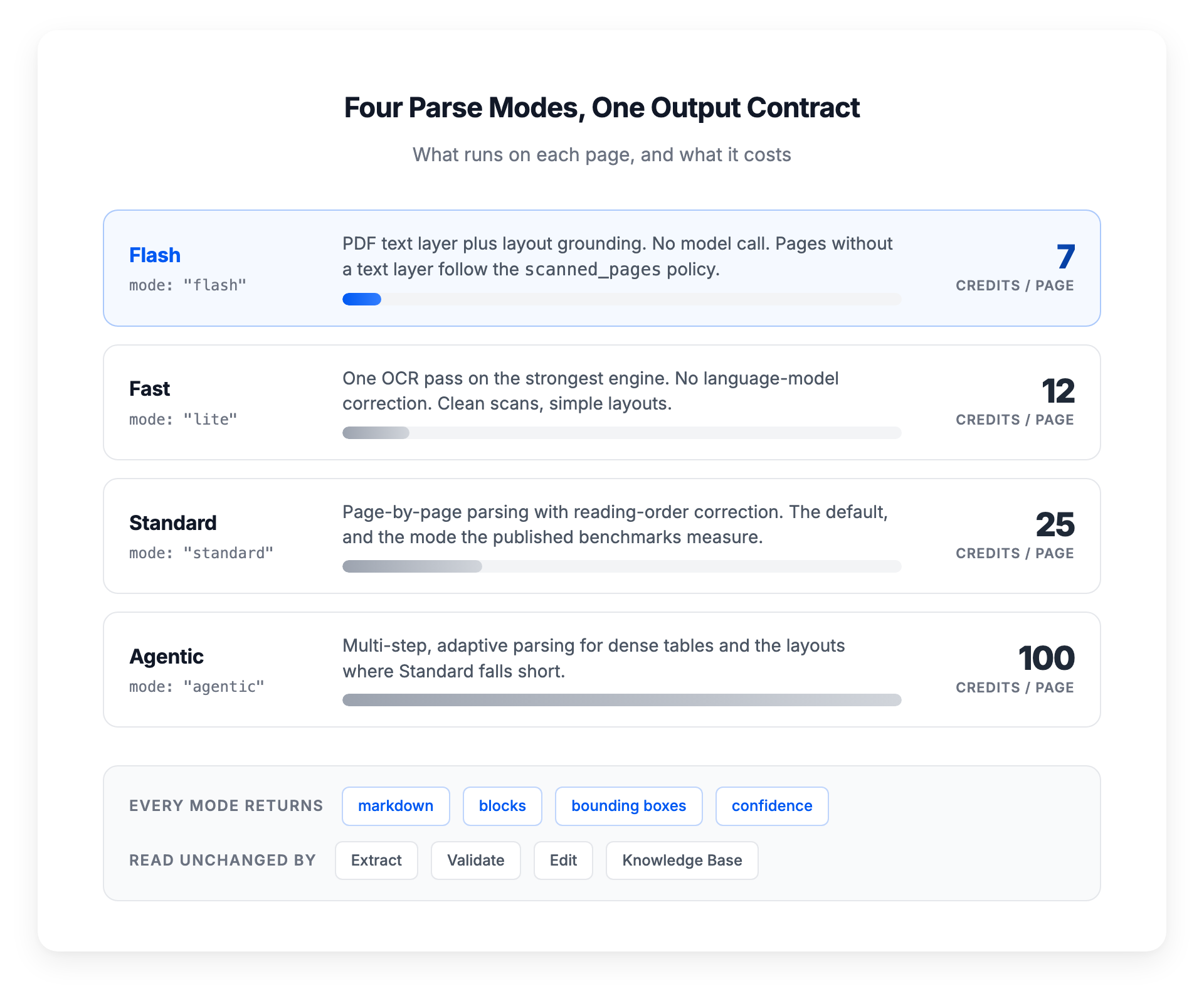
The output is the same output Parse produces in every other mode. Markdown for the whole document. Blocks with their bounding boxes and a confidence score. The same parse_confidence and layout_confidence the rest of the platform reads. That matters more than the price, because everything downstream is built on those blocks. Extract pulls fields from them and cites the region it read each value from. Validate checks them. Edit detects form fields in them. The Knowledge Base compiles them and answers questions with a citation to the page. None of those operators know or care which mode produced the blocks. Switching a workflow to Flash changes one setting on the Parse node and nothing else in the pipeline.
The cost is 7 credits per page, against 25 for Standard. And because there is no model in the loop, there is no inference to wait for.
The scanned page in the middle of the batch
The honest limitation of a text-layer parser is the page that has no text layer. A born-digital contract with a scanned signature page stapled to the end. An invoice PDF where page one was generated and page two is a photographed delivery note. In a batch of ten thousand files there will always be some.
Flash does not guess. Every page whose text layer contains no words is handled by the policy the workflow sets in scanned_pages, and there are three. ocr parses that page like any other page, on the OCR path, so the run completes with the whole document readable. skip serves the page blank and flags it, for pipelines where a missing page is acceptable and a surprise is not. fail stops the run with an error that names the page numbers, for pipelines where a scanned page means the document should never have been in this workflow.
Which one is right depends on the process, which is why it is a setting and not a default we picked for you. The point is that the behaviour is explicit and the run result tells you what happened. A scanned page in a Flash workflow is a fact you learn from the run, not from an empty field three steps later.
Four modes, one output contract
Flash is the bottom of a ladder that Parse now spans end to end. Flash, at 7 credits, reads the text layer with no model. Fast, at 12, runs a single OCR pass on the strongest engine, with no language-model correction, for clean scans with simple layouts. Standard, at 25, is the default: page-by-page parsing with reading-order correction, the mode our published benchmarks measure. Agentic, at 100, is the multi-step mode for dense tables and the layouts where Standard falls short.
The guidance in the documentation is deliberately conservative. Start on Standard. Move a workflow down to Fast or Flash for the document types where it holds up, and up to Agentic only where Standard underperforms. "Where it holds up" is not a hunch you have to take on faith: the Evals suite is how you find out. Build a ground-truth dataset for a document type once, run the workflow on Flash, and read the per-field result. If the numbers hold, the mode change pays for itself on the next batch. If they do not, you learned it on the dataset, not in production.
Where it pays
The use cases are the high-volume, machine-generated ones. Supplier invoices arriving as PDFs from other companies' billing systems. Bank and card statements downloaded from portals. Contracts, policies and reports generated from templates. The archive of ten years of born-digital documents that nobody has parsed because parsing it at model prices never made the budget, and that a Knowledge Base could be answering questions about next week.
The arithmetic is simple enough to do in your head. A workflow processing 100,000 born-digital pages a month on Standard spends 2,500,000 credits on parsing. On Flash it spends 700,000. Same output contract, same downstream workflow, same run results.
Flash is live in the anyformat platform today. Set mode to flash on the Parse node, choose the scanned_pages policy, and the rest of the workflow runs as it did before. The Parse documentation covers all four modes, and the credits page has the cost of each.
anyformat is the document intelligence platform that turns unstructured documents into reliable, structured data, with enterprise-grade security, confidence scoring, and full auditability. Learn more at anyformat.ai.